Body
If Honorlock is not working as expected, here are some easy troubleshooting steps you can take to correct the issue.
Ensure you are using Google Chrome:
Honorlock is only a compatible extension for the Google Chrome web browser.
Ensure Honorlock is installed:
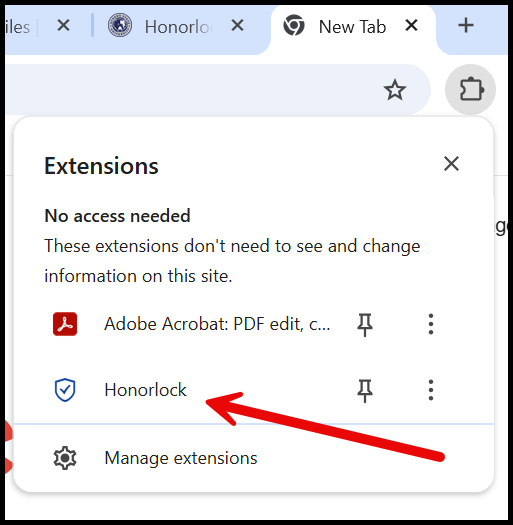
To ensure that Honorlock is installed on your Google Chrome profile, there will be a small puzzle piece icon beside the URL bar. Click on it to see that Honorlock is installed.

Remove Honorlock and any extra Extensions:
Sometimes the best way to fix Honorlock is to perform a clean install. You can remove Honorlock in the extensions tab. You should also ensure that there are no other remote proctoring applications installed when using Honorlock.
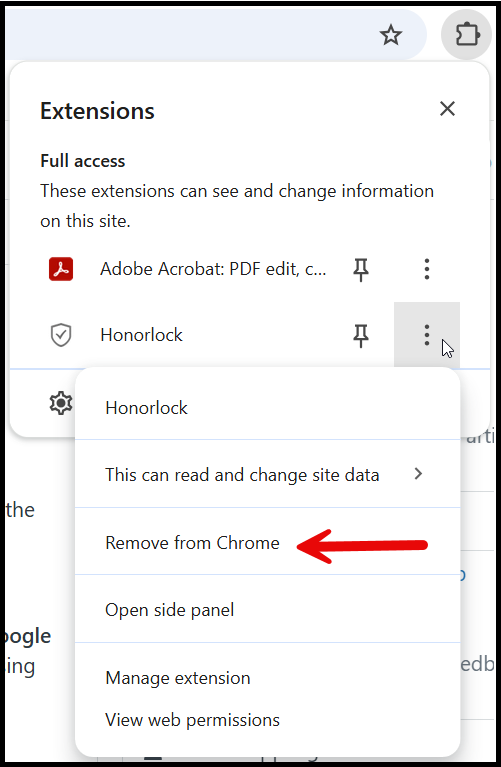
It is recommended to clear the cache and cookies after uninstalling Honorlock. Below is a guide on how to do so.
https://help.dmacc.edu/TDClient/392/Portal/KB/ArticleDet?ID=8163
Then you will want to go to https://app.honorlock.com/install/extension and reinstall/ install the HonorLock extension.
Last Resort if nothing else works: Creating a New Google Profile:
Sometimes it is necessary to create a new Google Profile just for Honorlock, to ensure there are no other remote proctoring applications that are present when using Honorlock.
To create a new Google Chrome Profile, within the browser, click on the account icon which will either be a person or your custom google account picture.
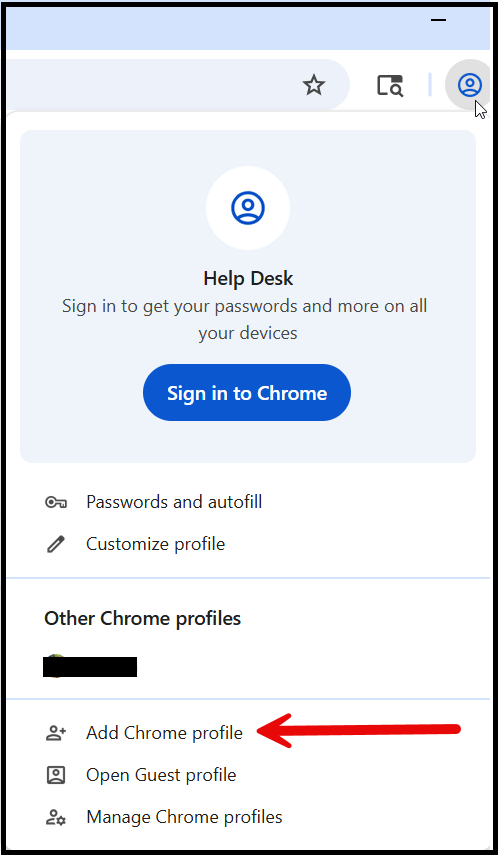
In the next window, choose “Continue without an Account”
Name the profile, and now you can choose between your two profiles, ensuring there is a dedicated Honorlock profile with nothing on it, but Honorlock.